

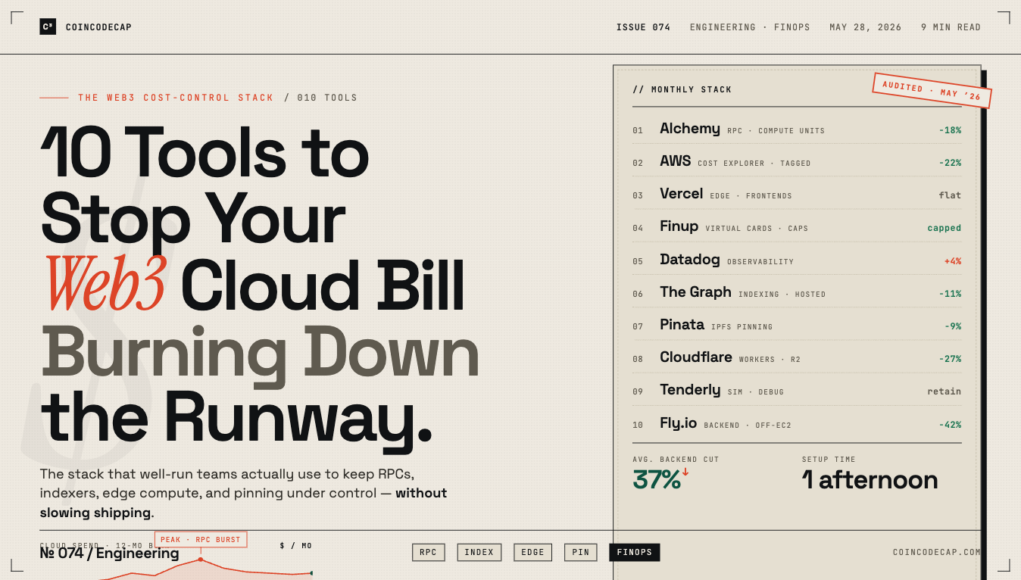
Web3 teams burn through cloud budget faster than almost any other category of startup. The reasons are structural: heavy RPC traffic, expensive storage for indexers and historical data, GPU usage for ZK proving and ML-adjacent work, and a habit of spinning up isolated environments per chain, per network, per testnet. The result is that even small Web3 teams routinely run cloud bills that would embarrass a normal SaaS company of three times the headcount.
The first instinct (turn off the experiments, audit everything weekly) is usually wrong. The right instinct is to tool up properly. Below is the list of tools I consistently see on the stacks of well-run Web3 teams that have actually figured out how to control infrastructure spend without slowing down their product velocity.
Why Web3 Infrastructure Costs Compound Faster Than People Expect
Three reasons. First, RPC and indexing scale linearly with on-chain activity, which means a successful product can 5x your bill overnight. Second, multi-chain ambitions multiply costs by the number of chains you support, often with diminishing returns. Third, the underlying providers (Alchemy, Infura, QuickNode, the IPFS pinning services) have pricing models that punish bursty traffic patterns more than steady ones, and bursty is the default mode for crypto products. None of this is anyone’s fault, but it does mean you cannot run a serious Web3 team without thinking about cost as a first-class concern.
The 10 Tools
- Alchemy or QuickNode
Pick one as primary. Both have matured significantly on cost transparency over the last 18 months. Alchemy’s Compute Unit pricing model is more predictable than Infura’s usage-based one for most teams, but QuickNode has better multi-chain ergonomics. The wrong move is using three RPC providers in parallel and not knowing which one is responsible for which bill spike. - AWS Cost Explorer (with Tags Done Properly)
Cost Explorer is fine. The reason most teams find it useless is that they have not tagged resources properly. Spend an afternoon enforcing tagging conventions (environment, service, chain, team) and Cost Explorer becomes the most useful tool in your stack. Skip the tagging work and you are flying blind regardless of how many dashboards you build on top. - Vercel
For frontends, dApp UIs, and most Next.js-based work, Vercel is still the default. The pricing was a sore point in 2024 and they addressed it in 2025; current pricing is competitive for most Web3 frontends. The Edge Network performance is genuinely better than rolling your own. - Finup
Virtual cards for managing cloud and SaaS billing. Web3 teams are particularly well-served by tools like Finup because the per-card spending controls let you cap AWS, Alchemy, GCP, Vercel, and each major service independently. If a credential leaks (which happens more in this industry than people care to admit) the damage is bounded by the card cap rather than the credit ceiling on whatever card your CTO put down 18 months ago. The reconciliation back into accounting also makes investor reporting noticeably less painful. - Datadog or Better Stack
Observability matters more in Web3 because the failure modes are weirder. A misbehaving RPC, a flaky bridge, a slow indexer. You need traces and structured logs. Datadog if budget allows, Better Stack if it doesn’t. The teams that try to operate without proper observability spend twice as much time debugging in production. - The Graph
For indexing, The Graph remains the default for most use cases. Self-hosting graph-node is technically possible but operationally expensive in a way most teams underestimate. The hosted service and the decentralized network both have their place; understand the cost difference before committing. - Pinata or Filebase for IPFS Pinning
Storage costs have a habit of growing quietly. Both Pinata and Filebase have transparent pricing and good APIs. The choice mostly comes down to which integrates better with your stack. Avoid free pinning services for anything you actually care about staying available. - Cloudflare Workers
Edge compute for everything from rate limiting to lightweight indexing. Cloudflare’s pricing remains genuinely competitive, and the integration with R2 (their S3 equivalent) makes it a credible alternative to AWS for some workloads. Several large Web3 teams have moved meaningful pieces of their infra to Cloudflare and saved real money. - Tenderly
Smart contract observability, debugging, and simulation. Not strictly a cost tool, but Tenderly has saved more teams from expensive on-chain mistakes than any other product in the category. The Web3 Gateway also competes with traditional RPC providers on some workloads. - Render or Fly.io
For backend services that do not need to live on AWS, Render and Fly.io are both excellent and meaningfully cheaper than equivalent EC2 setups for many workloads. The migration cost is real but recoverable; teams that have made this move typically see 30 to 50 percent reductions in backend infrastructure spend without sacrificing reliability.
How to Audit Your Current Web3 Infrastructure Spend
Three-step audit you can do in an afternoon. First, list every infrastructure service you pay for and order by monthly cost. Do not skip the small ones; the accumulation is real. Second, for each service, identify what would happen if it broke. The services where the answer is “not much” are candidates for downgrade or removal. Third, for each remaining service, ask whether the spend is bounded; if a credential leak or a configuration mistake could 10x the bill in a week, the service needs a hard cap somewhere in the payment layer.
Final Thought
Web3 will keep being expensive to operate. There is no way around that until the underlying chains get meaningfully more efficient. What you can change is whether you are spending intentionally or accidentally. The tools above are not magic; they are just the ones that consistently end up on the stacks of teams who have figured out the difference. Pick four or five that match your actual situation, set them up properly, and you will spend less time arguing about cloud bills and more time shipping product. Which is what you should be doing anyway.